Understanding Linux I/O

When I first started studying about the linux working fundamentals, I/O (input-output) was one of the topics which kept slipping from my grasp. This writeup would (hopefully) give basic enlightenment of how I/O is handled in linux.
Before we begin talking about I/O, we must familiarize ourselves with few concepts, like the linux kernel. Now you might have multiple questions in your mind, including -
What the heck is a kernel ?
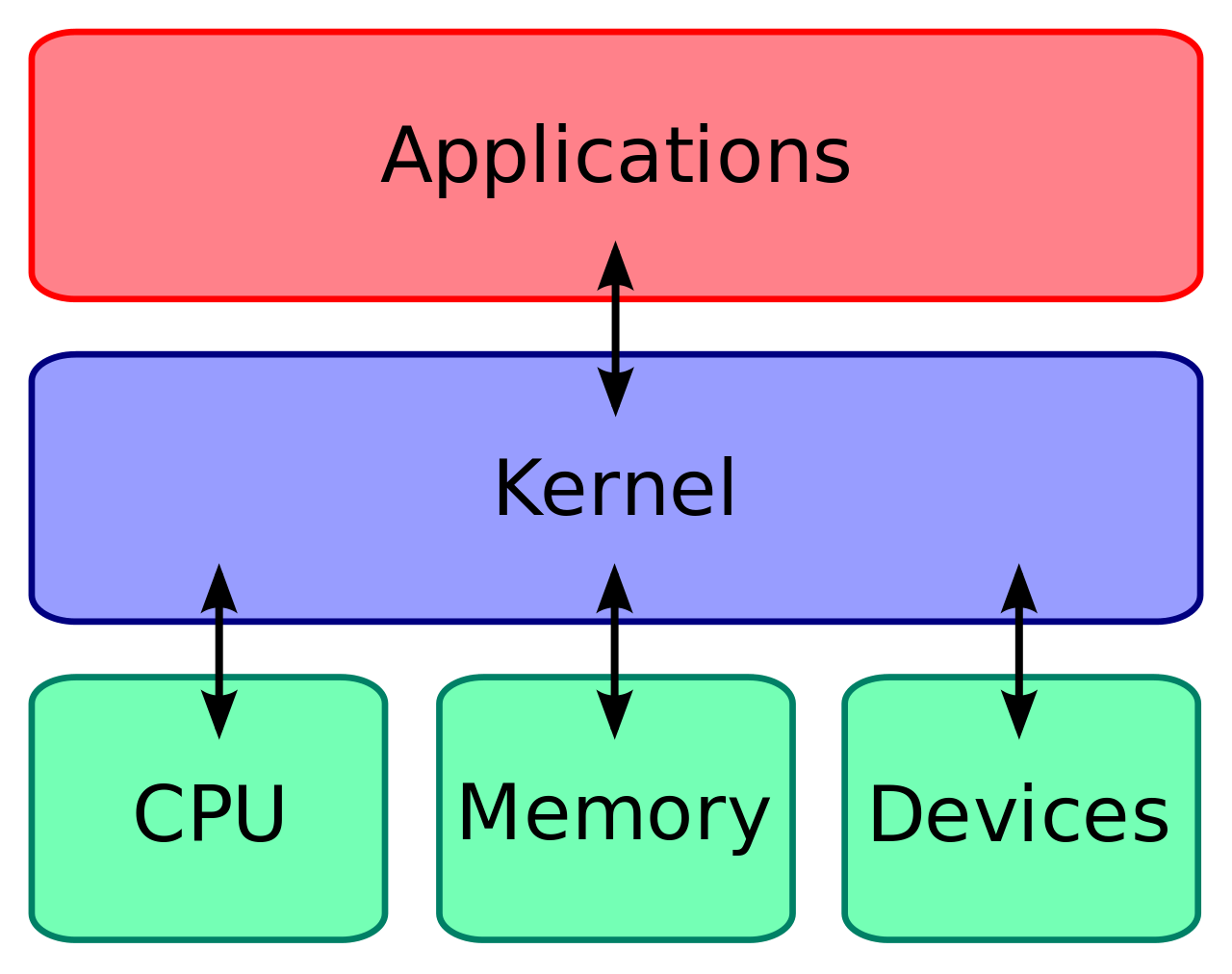
Simply put, a kernel is a software that runs and manages resources on the system.
Resources here are basically CPU, Memory (volatile and non-volatile) and other devices (keyboard, speakers,....GPUs).
The kernel just sits between the applications and underlying hardware, making sure that the applications are not abusing:
- The hardware (by taking more resources than what is required by the application)
- Other Applications (tampering/messing with their resources - eg. reading the data of other application in the memory/writing data to other application's memory)
So, we can say that it governs the applications and takes care of the resource distribution of the system. The following visual would better aid in understanding what was just discussed.
So now that we've got an overview of what a kernel is, and the role it plays, now we'd touch upon the concept of Universal I/O on linux.
Universal I/O
Everything is a file in linux. I'd circle back to this towards the end.
If you've never used linux, you might be confused by the statement You might be asking - If everything is a file in linux, what about folders ?
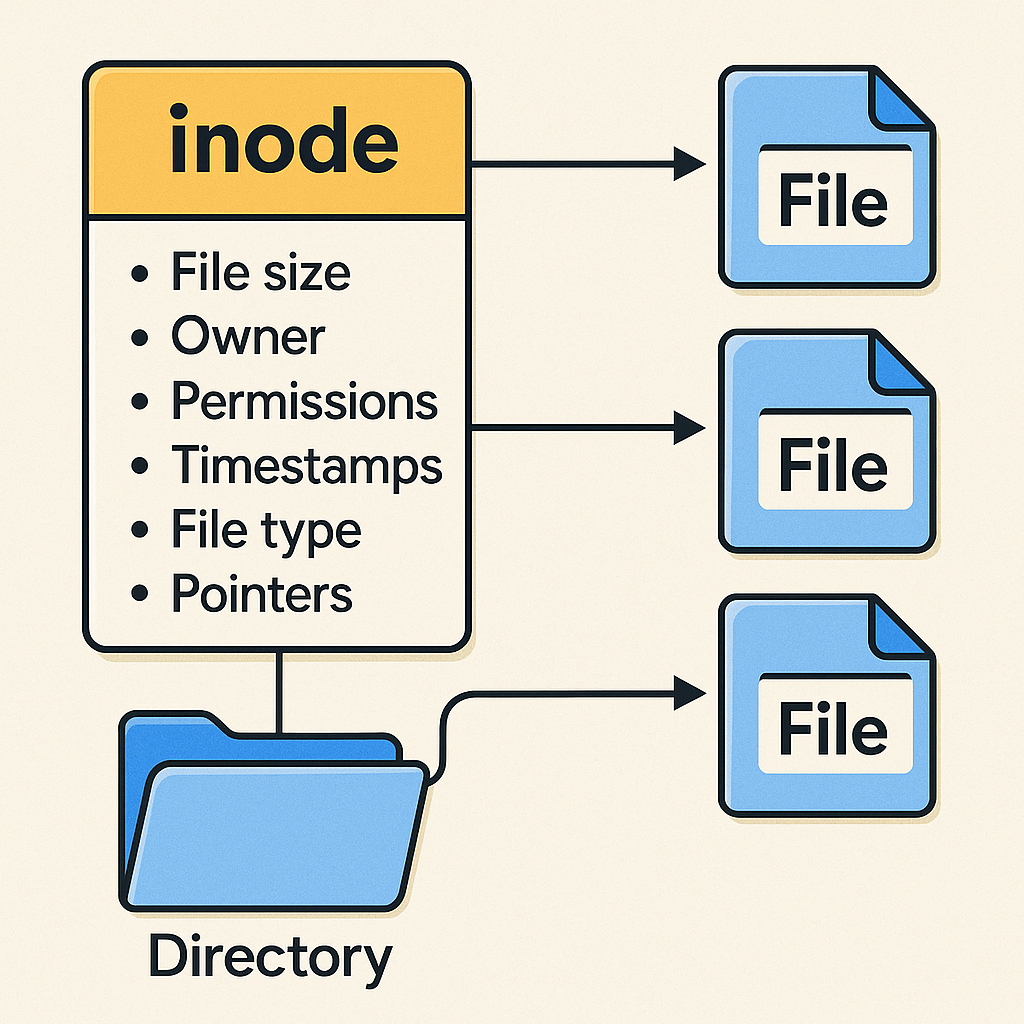
My friend, folders are basically special types of files that hold information about other files (maps the filename in the folder to their respective inodes).
Inode ? What is it ?
Inodes are usually a data structure that stores details about a file, but not its actual name or data.
This image would help clarify any confusions if any
So now, since we've made an understanding that everything is a file, it isn't surprising to note that the devices you interact with (hard drive, ssd, keyboard, mouse, printer, camera, etc) are also files in linux. These types of files are called device files, usually under /dev directory. All the operation that we do on a hardware (like type a key on keyboard), gets translated to an operation made on a file (which corresponds to the keyboard device file). Interesting stuff.
So now, how does this work ? Since everything is a file in linux, operations can be performed on them, operations like read, write, open and close. These four horsemen are called the standard I/O operators, and the work on any file on linux, be it a regular file, a directory, a device file, symlinks, pipes or sockets. These four operations can be performed by anyone (or any software) on any file, provided they have necessary access to do so.
These functions - open, close, read, write are basically an API provided by the kernel. Such APIs provided by the kernel are known as System Calls (or syscall in short).
Based on the knowledge we've acquired so far, we can now say that an I/O system call can be used on any type of file.
Let us now go through the universal I/O system calls.
Syscall: open
This syscall is used to open a file.
What do we mean by "opening" a file ?
When we "open" a file, the kernel assigns a special number (a positive integer) to keep track of the file that is opened. This number is known as a File Descriptor (or FD in short). Each process can have multiple FDs so each process has its own encapsulation of FDs. The main idea of an FD is to decouple a file path and its file object.
If a program wants to read and write to a file from two different places, two entries would be created in the system-wide open file description table (OFD table).
The first three FDs (stdin, stdout, stderr) are special FDs. They have the FD numbers 0,1 and 2 respectively.
For example, say a file is opened in process A, its given an FD 20; and if the same file is opened in process B, it can either be given an FD of 20 or some other number. Each process has its own FD table, whose entries point to open file descriptions in the system-wide open file table. An open file description contains information such as the current file offset and file status flags.
The open syscall looks something like this -
open(path, flags, mode)
It returns a FD using which we can further work upon. In case the open syscall fails, it returns -1 and sets the errno variable corresponding to the failure code.
Syscall: read
The read syscall, as the name suggests simply reads from a FD and stores the value in a buffer.
read(fd, buffer, count)
Count is basically the number of bytes to read. It returns the number of bytes read on success.
Syscall: write
This is similar to read, instead it writes to the FD from the buffer.
write(fd, buffer, count)
Upon success, it returns the number of bytes written.
Syscall: close
This syscall, when invoked, removes the FD from the process FD table, frees the FD number for the process, and if no other process is referencing the entry pointed by this FD on the system-wide OFD table, all resources of this file is freed and the entry is removed from OFD table aswell.
close(fd)
Upon success, it returns 0 .
Syscall: lseek
As we discussed, these four syscalls can be performed on any file type.
- Want to write to a file, use
writesyscall on a normal file - Want to write data on a socket, use
writesyscall on a socket file
So what if I open a file, and want to write to a specific location to the file ?
This is where we have helper syscalls for the I/O.
lseek(fd, offset, whence) is used to move the file pointer in a file. File pointer is just a position where the current pointer is there in a file. The whence defines from where we want to move the pointer. We can either move from the start of the file, the end of the file, or the current position of the file pointer. Upon success of moving the file pointer by the offset amount, the seek syscall returns the new position of the file pointer.
Ioctl
Let's say you buy a brand new GPU and want to perform syscalls on it. What would you write to it ? What type of data ?
There are such few instances where we need to install a custom linux driver for a device so that linux can communicate with it.
For these kind of custom drivers, standard I/O are not enough. We need a general purpose mechanism for performing file and device operations. This is where we have ioctl (I/O Control). The creators of the drivers define the functionalities that can be performed by the devices as requests and each request has an ID. This request ID can be known by reading the corresponding driver documentation.
The ioctl syscall looks like this
ioctl(fd, request, *args...)
So, if we know that a device is mounted at /dev/sdx, we'd first create an FD to communicate with it using the open syscall. Now that we've got an FD to work with, we'd send it ioctl commands to perform our request to the device by passing the request ID, and any additional arguments needed by the device to process the request in the *args... Section.
Also note that ioctl is not just for custom drivers, many existing kernel drivers use ioctl to expose device specific operations.
File Holes
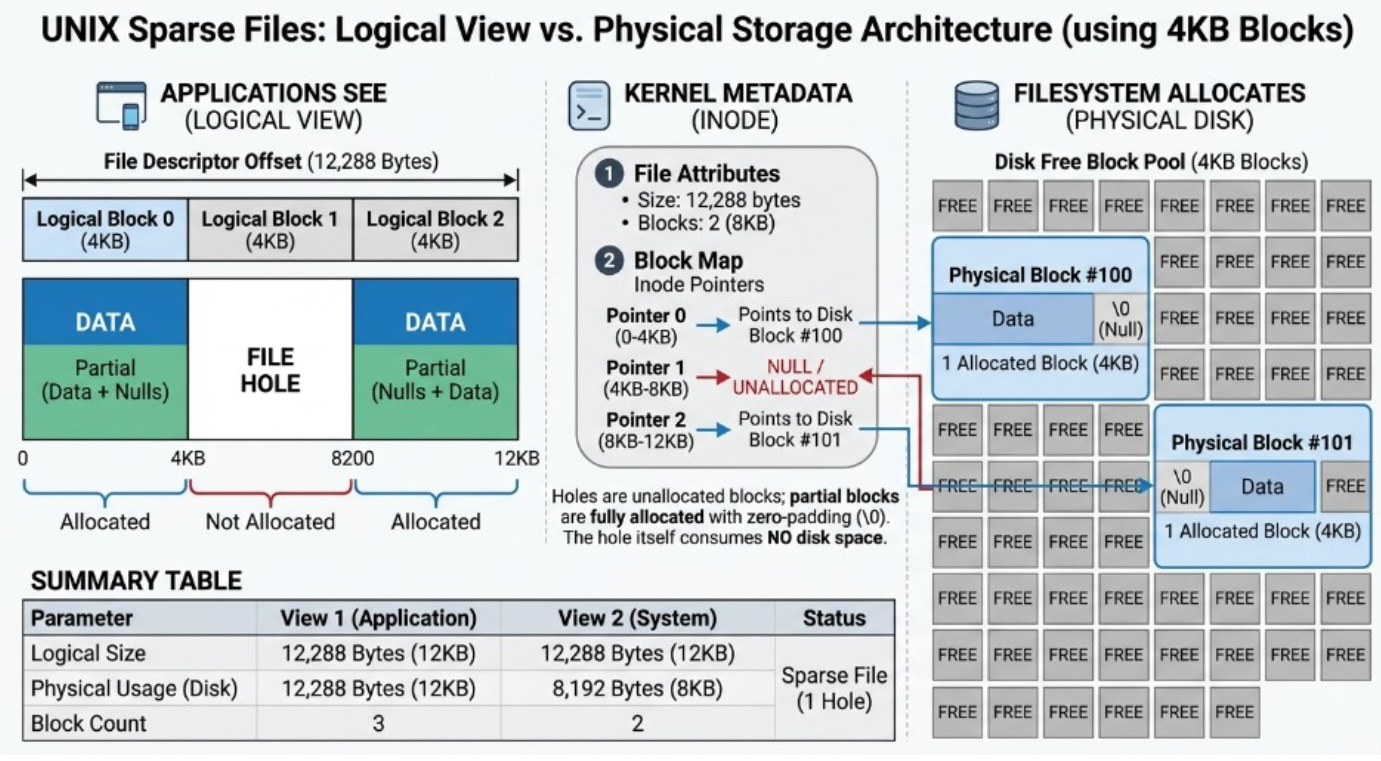
Now let's say I have a file, I opened the file using open syscall, wrote 5 bytes using write syscall, and moved the file pointer about 2^30 bytes (equivalent to a GB). So now when I write 2 bytes at this offset and close the file, what do you think my file size would be ? A gigabyte right, since we wrote in the beginning of the file, moved the pointer to a gigabyte equivalent bytes and wrote something at the end too. Yes, now this is the logical size of the file. Does it occupy a gigabyte on the disk ? The logical size of the file is about 1 GiB, but the amount of physical disk space actually allocated to the file can be much smaller.
The empty space in between the first and last bits we wrote is called a file hole. The filesystem doesn't need to allocate physical blocks for this empty region; instead, it records it as a hole.
A picture says a thousand words, and if explain file holes with another thousand words, this writeup would get too long, so here's the equivalent picture.
Since I mentioned earlier that everything is a file in linux; technically, Linux presents many resources through a file-like interface. Sockets, for example have an FD but aren't ordinary files.
Wrapping Up
And that's pretty much the mental model I wanted to build with this writeup.
We started with the Linux kernel and its role as the layer that manages system resources and provides an interface between applications and the underlying hardware. From there, we looked at how Linux exposes many different resources through a common file-like interface.
We then followed the journey of an I/O operation:
Once you understand the role of a file descriptor, read(), write(), close(), and lseek() start to look much less mysterious. They are simply different ways for a process to ask the kernel to perform an operation on a resource it has access to.
And when the standard read/write interface isn't enough, mechanisms such as ioctl() allow device-specific operations to be exposed through the same general file-descriptor model.
There are obviously a lot more details hiding underneath all of this - buffering, page cache, blocking vs non-blocking I/O, asynchronous I/O, DMA, interrupts, device drivers, filesystems, sockets, and much more. But those are rabbit holes for another day.
For now, if there's one thing I'd like you to take away from this writeup, it's this:
An application doesn't directly talk to the hardware. It talks to the kernel, usually through file descriptors, and the kernel takes care of communicating with the underlying resource.
That's the basic idea behind Linux I/O.
And honestly, once this mental model finally clicked for me, Linux I/O stopped feeling like a collection of random syscalls and started feeling like one coherent system.
Now go break something and figure out what the kernel did about it. :)